Website Load Time: How Design Affects Page Speed

You click a link, the screen stays blank, a logo appears, then the page slowly shuffles itself into place. Most of us do not wait around for that to finish — we go back and try the next result. Your visitors behave exactly the same way on your website.
When business owners think about a slow website, they often blame hosting or “the internet”. Those things matter, but a large part of your load time is decided much earlier, at the design stage. The images chosen, the fonts, the layout features and the number of extras bolted onto each page all add weight. This guide explains how design affects page speed, and the choices that keep a small business website loading quickly.
Why Speed Matters More Than You Think
A slow page taxes everything your website is trying to do. Visitors leave before reading your message, enquiries and sales quietly drop, and search engines take loading speed into account when deciding how pages rank — one reason designing websites for SEO and designing for speed are really the same conversation.
Speed also shapes how professional your business feels. A site that snaps into place looks competent and trustworthy. A site that stumbles in piece by piece makes visitors wonder what else might be sloppy. The good news is that most speed problems on small business sites come from a short list of design decisions, and most of them are fixable.
Images: The Heaviest Part of Most Pages
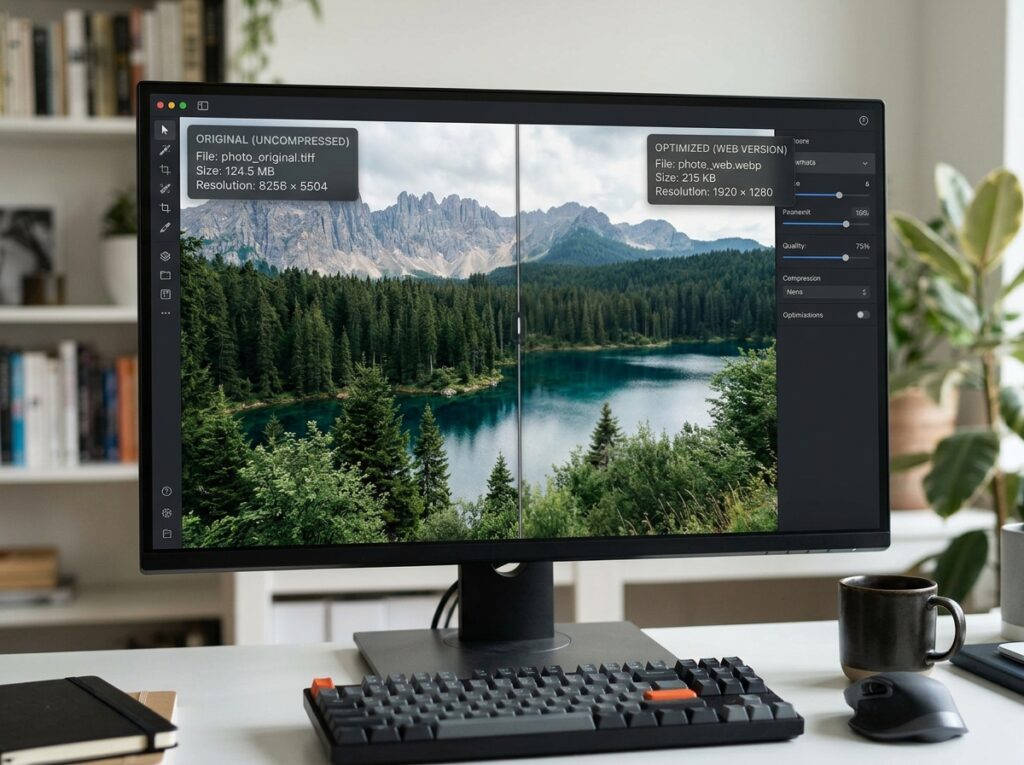
On a typical small business website, images account for most of the weight a visitor’s browser has to download. A photograph taken on a modern phone or camera is made for print-quality detail, not for a web page. Uploaded as it comes, it can be many times larger than the size it is actually displayed at, and every extra kilobyte adds waiting time.
Resize before you upload. If an image will be shown at a modest width on the page, prepare it at roughly that size rather than uploading the full original and letting the browser shrink it.
Compress every image. Compression tools reduce file size dramatically, usually with no visible difference on screen. Make it a habit for every photo, banner and product shot.
Choose the right format. Modern formats such as WebP often produce smaller files than older JPEG and PNG files at the same quality. Your designer or website platform can usually handle the conversion for you.
Fonts, Features and Other Hidden Weight
Images get the blame, but they are not the only load on a page.
Too many fonts. Every font family and weight your design uses is another file to download. Limiting a site to one or two fonts with a few weights keeps text rendering fast and, as a bonus, usually looks tidier.
Sliders and heavy animation. Large homepage sliders, background videos and elaborate animations all add files and scripts. Ask honestly whether each one earns its place. A single strong image with a clear headline often communicates more than a rotating banner — and loads in a fraction of the time.
Plugins and add-ons. On platforms like WordPress, every plugin can add its own code to every page. Review them occasionally, remove what you no longer use, and be wary of installing a plugin for something a small design change could achieve.
Embedded extras. Maps, social feeds, chat widgets and video embeds pull content from other services, and your page waits for each of them. Keep the ones that genuinely help visitors and drop the rest.
Layout Choices That Slow Pages Down
Some speed problems are built into the structure of the page itself. Designs that load everything at once — every photo in a long gallery, every product in a catalogue — force the browser to do a lot of work before anything useful appears. Techniques such as lazy loading, where images further down the page only load as the visitor scrolls towards them, keep the first screenful quick.
A clean, focused layout helps too. Pages designed around one clear goal, with content in a sensible order, tend to be lighter than pages crammed with competing sections. And because so many visitors are on phones, responsive web design that serves sensibly sized images to smaller screens prevents mobile visitors from downloading desktop-sized files they will never see at full size.

How to Check Your Own Website’s Speed
You do not need technical skills to get a useful picture of your site’s speed. Free tools such as Google’s PageSpeed Insights will test any page and give it a score for mobile and desktop, along with a list of the biggest problems it finds, in plain language. Test your homepage and one or two important inner pages, and always pay more attention to the mobile result, because that is how most visitors experience your site.
Just as useful: open your website on your own phone, away from your office Wi-Fi, and time how long it takes before you can actually read and tap things. If it feels slow and awkward to you, it feels that way to your customers too.

Quick Checklist: Design Habits That Keep Pages Fast
- Resize and compress every image before uploading it.
- Use modern image formats where your platform supports them.
- Stick to one or two fonts, in only the weights you need.
- Question every slider, video background and animation.
- Remove plugins, widgets and embeds that no longer earn their place.
- Let images below the fold load lazily as visitors scroll.
- Test on a real phone, on a mobile connection, regularly.
Speed Is a Design Decision
Page speed is not a technical afterthought you bolt on once a website is finished. It is the accumulated result of design choices — image sizes, fonts, features and layout — made from the very first sketch. Choose with weight in mind, and your site will feel fast, professional and easy to use on any device.
If your website has slowed down as it has grown, Designores can review the design and rebuild the heavy parts so pages load the way they should. Have a look at our web design services and tell us what your site is doing now.