
Designing Websites for SEO: Key Elements for Better Rankings
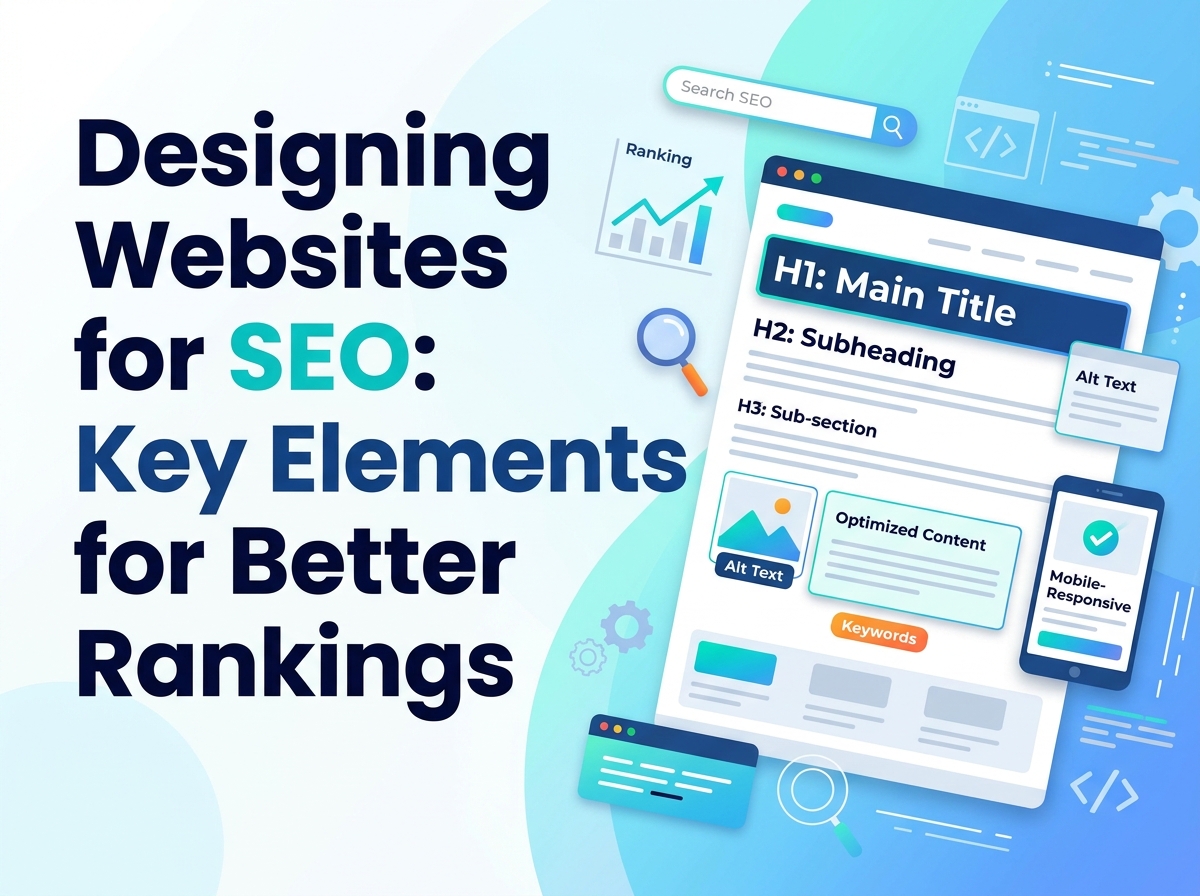
Search engines cannot see your website the way your customers do. They read its structure, follow its links, measure how it performs and try to work out what each page is about. That means design decisions — often made for purely visual reasons — quietly shape how well a site can rank. Good web design and good SEO are not competing priorities; done properly, they are the same job viewed from two sides.
No design change can promise a particular ranking, and anyone who guarantees one should be treated with caution. What design can do is remove the obstacles that hold a site back: confusing structure, slow pages, poor mobile presentation and pages search engines struggle to understand.
Site Structure and Navigation
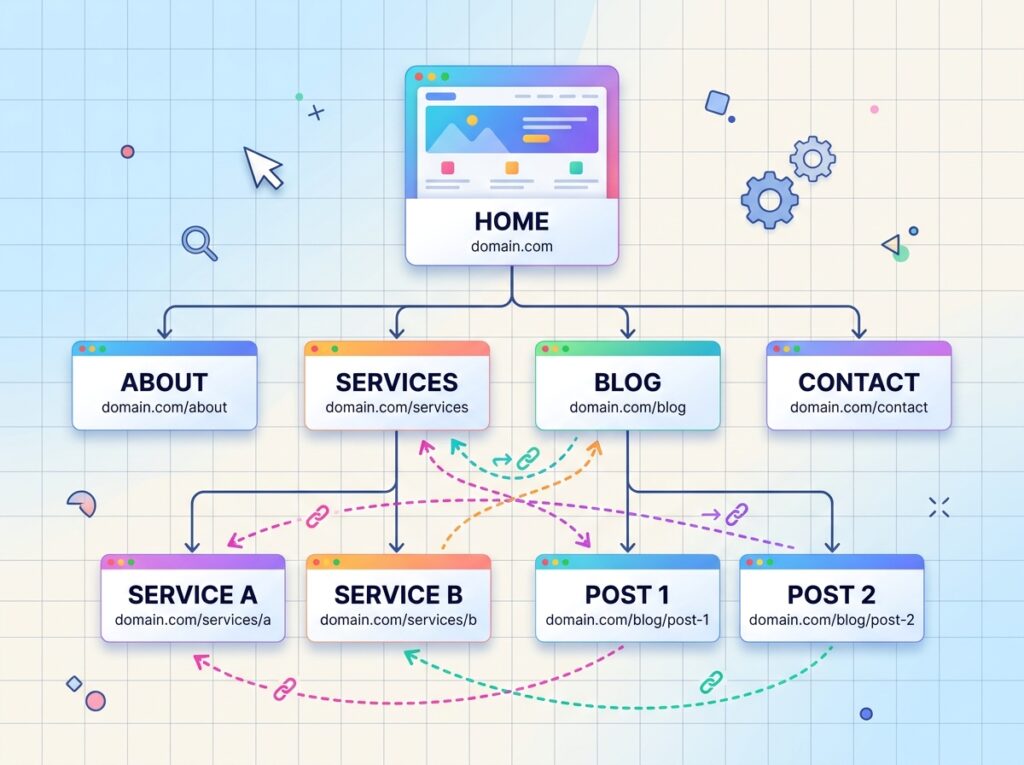
A search engine explores your site by following links, so your structure is the map it works from. Aim for a shallow, logical hierarchy: homepage, main sections, then the pages within them. Every important page should be reachable within a few clicks from the homepage, and none should be orphaned with no links pointing to it.
Navigation should reflect that structure honestly. Menu items labelled with the plain words people use for your services tell both visitors and search engines what each section covers, and breadcrumb links on deeper pages reinforce the hierarchy. If a human can immediately understand how your site is organised, a search engine usually can too.
Headings and Content Layout
Headings are how a page explains itself. Each page should have one clear main heading that states its subject, with subheadings breaking the content into scannable sections in a sensible order. Used this way, headings help search engines understand what the page covers and help readers — many of whom skim before they commit — find the part they need.
Layout choices matter alongside the words. Long blocks of uninterrupted text discourage reading and hide your key points; short paragraphs, lists where they genuinely help, and descriptive subheadings make content easier to use — and easier content tends to earn the engagement every site wants.
One caution: headings exist to organise meaning, not to style text. Choosing a heading purely because it looks the right size, or stuffing headings with keywords, muddles the very signals you are trying to send.

Page Speed and Image Handling
Speed is both a ranking consideration and a design discipline. Slow pages frustrate visitors, and frustrated visitors leave. The most common causes are within the designer’s control: oversized images, heavy animations, too many fonts and scripts, and page builders loaded with features the page never uses.
Images deserve particular attention, because they are usually the heaviest part of a page. Practical habits make a real difference:
- Export images at the size they will actually be displayed, not the size they were photographed.
- Use modern formats and compression so files stay small without visible loss of quality.
- Write descriptive alt text for meaningful images, which helps search engines understand them and helps visitors using screen readers.
- Load below-the-fold images only when a visitor scrolls to them, so the top of the page appears quickly.
Design with performance in mind from the start, rather than trying to speed up a finished design afterwards.
Mobile-Friendliness Is Not Optional
Search engines assess the mobile version of a site first, because that is how most people browse. A site that is awkward on a phone — tiny text, buttons too close together, content wider than the screen, pop-ups that cannot be closed — works against itself in search results as well as with customers.
This is why responsive web design has become the standard approach: one site that adapts cleanly to every screen size. Test on real phones, not just a resized desktop window, and check the tasks that matter — reading a page, completing a form, finding your contact details — one-handed.

URLs and Internal Linking
URLs are part of your design’s information architecture. Short, readable addresses that describe the page — words separated by hyphens, reflecting where the page sits in your structure — are easier to trust, share and remember, and they reinforce what the page is about. Avoid long strings of numbers or parameters where a plain address would do, and think twice before changing URLs on an established site, because existing links attach to the old addresses.
Internal linking is the other half. Links between your own pages distribute attention, show search engines which pages matter most, and guide visitors to related reading. Link where it genuinely helps the reader: from a service page to a relevant guide, from a blog post to the service it discusses. Descriptive anchor text — the words you actually link — tells both audiences what they will find. Shops, for example, can apply the same thinking described in our guide to e-commerce web design best practices, where internal links carry shoppers from guides to products.
Accessibility Basics That Help Everyone
Accessible design and SEO overlap more than most people expect. Descriptive alt text, sufficient colour contrast, readable font sizes, keyboard-friendly navigation and captions or transcripts for video all help visitors with different needs — and several of them give search engines clearer information about your content at the same time.
Treat accessibility as a design standard rather than a final check. A site that everyone can use comfortably is simply a better-built site, and better-built sites are what search engines try to surface.
What to Ask a Designer
If you are commissioning or redesigning a website, a few questions early on will tell you whether SEO has been considered:
- How will the site’s structure and navigation be organised?
- What will you do to keep pages fast, especially images?
- Will the design be fully responsive, and can I test it on real devices?
- How are headings, URLs and internal links handled?
- What happens to my existing URLs and rankings if pages move?
A designer who answers these plainly, without promising specific positions, is one who understands how design and search fit together.
Frequently Asked Questions
Can good design alone get my site to the top of Google?
No. Design removes obstacles and presents content well, but rankings also depend on the quality and relevance of your content and on factors beyond your site. Anyone promising a specific position is promising something they cannot control.
Does my site need rebuilding to fix its SEO design issues?
Often not. Structure, headings, image sizes and internal linking can usually be improved on an existing site. A rebuild becomes sensible when the underlying platform or layout prevents those fixes.
How do I know if my site is mobile-friendly?
Use it yourself on a phone, honestly: read a full page, tap every button, complete your own contact form. If anything requires pinching, zooming or patience, your visitors are noticing the same thing.
Design That Search Engines Can Understand
Designing for SEO is mostly designing well: a structure that makes sense, pages that load quickly, content organised with clear headings, and a mobile experience that respects the visitor. Build those elements in from the start, and search engines can find, understand and present your site properly.
If you are planning a new site or a redesign and want these elements handled properly from day one, Designores can help — take a look at our web design services to see how we approach it.





2 Comments