
UX vs UI: Understanding the Key Differences for Your Business
If you are planning a new website or a redesign, you will hear two terms used almost interchangeably: UX and UI. They are often bundled together in a single job title or a single line on a proposal, which makes it easy to assume they mean the same thing. They do not. UX and UI are two different disciplines that overlap, support each other and, when both are done well, quietly decide whether your website feels effortless or frustrating to use.
Understanding the difference matters for a practical reason. When something goes wrong with a website — visitors cannot find the contact page, the checkout takes too long, the site looks dated — the fix depends on knowing which side of the design is causing the problem. This guide explains what each term covers, how they differ, and why your business needs both working together.
What UX Design Means
UX stands for user experience. It covers everything a visitor feels and does while using your website: how easy it is to find information, how the pages are organised, how many steps a task takes, and whether the whole journey makes sense from start to finish.
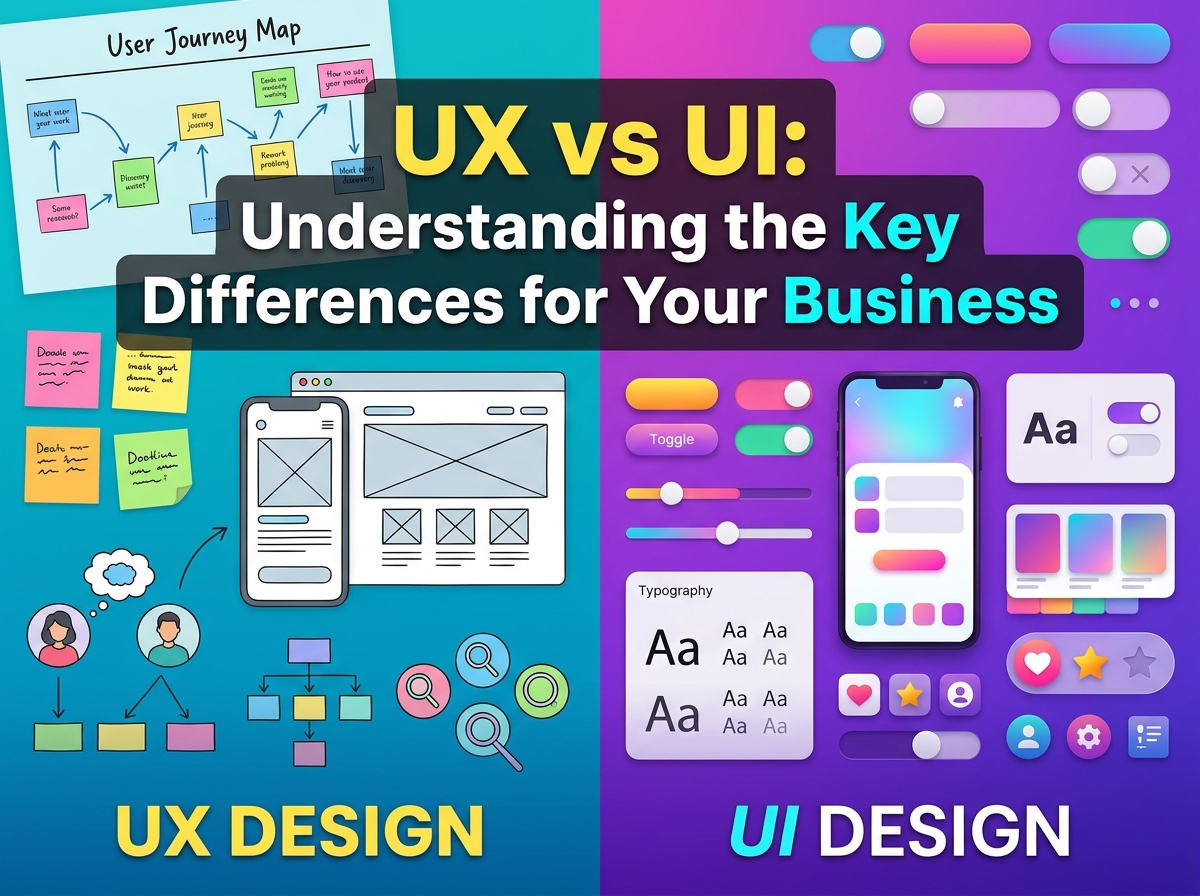
UX design is mostly invisible when it works. It includes researching what your customers actually need, planning the site structure, mapping the steps from landing on the homepage to sending an enquiry, and testing whether real people can complete those steps without getting stuck. A UX designer thinks in journeys and tasks rather than in colours and fonts.
A simple example: a plumber’s website where the phone number appears on every page and the booking form asks only for the essentials has good UX. The same site with a beautiful homepage but a phone number buried three clicks deep has poor UX, no matter how good it looks.
What UI Design Means
UI stands for user interface. It covers everything a visitor sees and interacts with on the screen: the colours, typography, buttons, icons, spacing and layout of each page. UI design is the visual layer of the website, and it is the part your customers notice first.
A UI designer’s job is to make the interface clear, consistent and attractive. Buttons should look like buttons. Headings should be easy to scan. Text should be comfortable to read on a phone as well as on a desktop. When UI is done well, visitors can tell at a glance what matters on a page and what they can do next.
Returning to the plumber: the UI is the clean layout, the readable type and the tap-friendly call button in a colour that stands out. UI does not decide where in the journey that button belongs — that is UX — but it decides how the button looks and how easy it is to spot.

The Key Differences at a Glance
- Focus. UX is about the overall journey and how a task feels; UI is about the look and feel of each screen.
- Main question. UX asks, “Can visitors complete this easily?”; UI asks, “Is this clear and pleasant to use?”
- Typical work. UX produces site maps, wireframes and user flows; UI produces visual designs, style guides and design systems.
- How it is judged. UX is judged by whether people succeed at their tasks; UI is judged by whether the interface is consistent, readable and on brand.
- Order of work. UX usually comes first, because the structure should be settled before the visuals are polished.
In short, UX is the path through the website and UI is the signposting and surface of that path. A site can have polished UI and weak UX — beautiful pages that confuse people — or strong UX and weak UI, where everything works but looks tired and untrustworthy. Neither is enough on its own.
A Real Example: Buying and Booking Online
Consider an online shop. The UX work decides how many steps sit between the product page and the payment confirmation, whether delivery costs appear early or as a surprise at the end, and how easy it is to filter a long product list down to the few items that matter. The UI work decides how the product cards look, how prices are displayed and whether the checkout button is impossible to miss.
The same split applies to a booking journey, a quote request form or a simple contact page. If you sell online, our guide to UX design tips for e-commerce sites goes deeper into the journey side of this example, step by step.

Why Your Business Needs Both
For a small business, this is not an abstract distinction. Visitors judge your credibility within moments of landing on your site, and they leave quickly when a task feels like hard work. Good UI earns the first impression: a clean, professional interface suggests a business that takes care over details. Good UX earns the outcome: the enquiry sent, the appointment booked, the product bought.
Problems also get cheaper to fix when you know which discipline owns them. If customers say your site is confusing, repainting it will not help — the structure needs UX work. If they say it looks dated or is hard to read, rearranging the pages will not help — the interface needs UI work. Naming the problem correctly saves you paying for the wrong solution.
The two meet most clearly on mobile. Whether a page adapts gracefully to a small screen is partly a layout question, but whether the mobile journey keeps the important actions within easy reach is UX. If most of your visitors arrive on phones, it is worth understanding responsive web design as the foundation both disciplines build on.
Common Misunderstandings
“They are the same job.”
In small teams the same person often handles both UX and UI, which is perfectly fine. But the two kinds of thinking are still distinct, and a good designer switches deliberately between them — structure and journeys first, then the visual layer that brings them to life.
“Looks come first.”
It is tempting to start with colours and fonts because they are visible and enjoyable to choose. In practice, settling the structure first means the visuals are designed for pages that actually work, rather than decorating a layout that later has to change.
“UX is only for big companies.”
The opposite is closer to the truth. A large company can survive a clumsy website on brand strength alone; a small business cannot. Every visitor your site loses to confusion is one a competitor can win with a clearer journey.

Frequently Asked Questions
Which should I prioritise with a small budget?
Start with UX basics: a clear structure, obvious contact routes and short forms. Then apply a clean, consistent UI. A simple site that works well beats a fancy site that frustrates people.
Can I improve UX without redesigning everything?
Often, yes. Moving key information higher on the page, shortening a form or clarifying menu labels are all UX improvements that do not require a full redesign.
How do I know whether my site has a UX or a UI problem?
Watch where visitors struggle. If they cannot find things or abandon tasks halfway, think UX. If they find things easily but the site looks inconsistent or the text is hard to read, think UI.
Bringing the Two Together
In short: UX decides how your website works, and UI decides how it looks and feels — and your customers experience the two as one thing. If your website is due a refresh and you would like both sides handled together, Designores offers web design services that cover the whole journey, from structure to finished visuals. Get in touch and tell us what your website needs to do for your business.





5 Comments